Organised courses and students
Keep course editions, enrolments and student profiles together so your team shares the same context.
Management for training centres and providers
Organise courses and students with the free Standard plan. With Premium, access the full application to coordinate sales and view global statistics too.
No credit card required.
Day-to-day management for up to 1,000 courses, 100 records, 10,000 students, 100 trainers, 500 companies and 3 training centres.
Request access. Our team sets up your account for free.
Standard free · Premium €149/month, excluding taxes. Automation credits purchased separately.
Wiso Edu
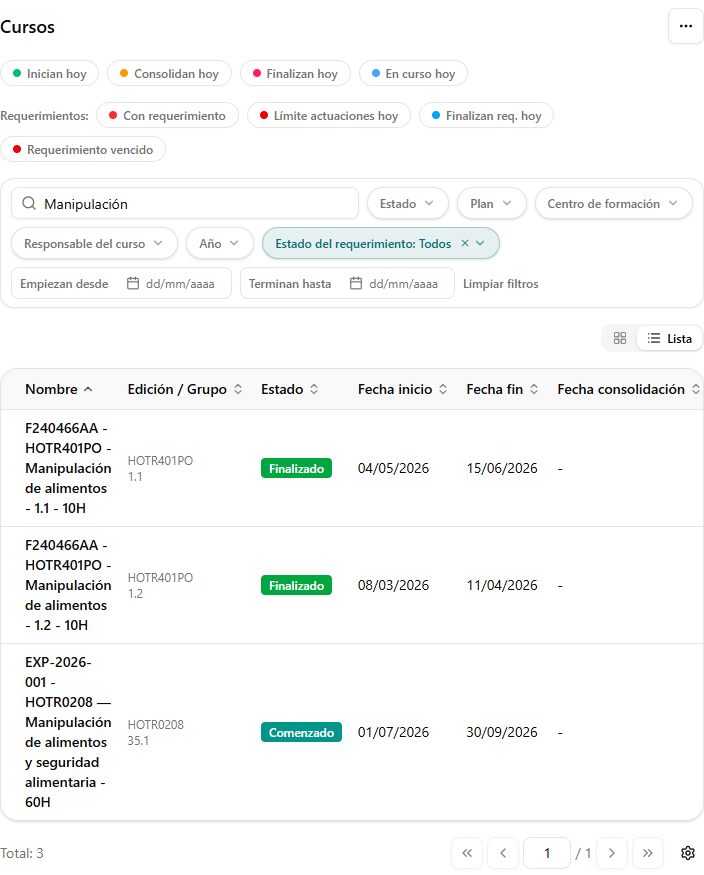
Search your courses and review statuses and dates to organise your team’s work.
Training management, not a learning platform: organise your operation without replacing the space where you deliver course content.
Keep course editions, enrolments and student profiles together so your team shares the same context.
Find each student’s documents and each course’s progress in one place.
With Premium, coordinate sales management and review global training statistics.
Inside Wiso Edu
A one-minute video walks through the actual application with demo data. Further down you will find every screen, plan by plan, with its screenshot.
What Standard includes, what Premium adds and what you automate with separate credits, shown on real application screens.
Subscriptions and credits
Your subscription gives you platform access. Automation uses credits purchased separately, including on Premium.
Premium billing
Excluding taxes · Credits separate
All the day-to-day management of your training centre.
Request free accessStandard limits count all stored courses, records, students, trainers, companies and training centres, including historical records, regardless of status.
Renews monthly, with no minimum term.
Excluding taxes · Credits separate
For teams that also need sales management and a global view of their training operation.
Request a Premium demoAnnual Premium: €1,490/year. Save €298 compared with 12 monthly payments: 2 months off.
Prices exclude taxes. Standard includes day-to-day centre management: students, courses, course calendars, trainers, companies and records. Premium adds sales management, course packs, course tracking, requirements, reservations, the activity log, the Moodle connection, global statistics and gift cards, with no record limits. On both plans, automation uses credits purchased separately: Premium access does not include unlimited automation usage.
Automation · Pay per use
Buy credit packs for automated internal tasks in Wiso Edu. The base price is €1 per credit; larger packs lower the unit cost.
€100
€1 / credit
Base rate
€450
€0.90 / credit
Save €50
€1,600
€0.80 / credit
Save €400
Prices exclude taxes. Savings are calculated against the €1-per-credit base rate. The automation catalogue, usage per task and credit terms are awaiting confirmation. Packs cannot be purchased online on this website; contact our team.
Contact our sales team| What is included | StandardDay-to-day management · Free | PremiumComplete management |
|---|---|---|
| Management and capacity (limits count stored records, in any status) | ||
| Basic management of courses, students, records, companies, trainers and training centres | Included | Included |
| Course calendar | Included | Included |
| Public API for integrations | Not included | Read and write |
| Courses | Up to 1,000 | Unlimited |
| Records | Up to 100 | Unlimited |
| Students | Up to 10,000 | Unlimited |
| Trainers | Up to 100 | Unlimited |
| Companies | Up to 500 | Unlimited |
| Training centres | Up to 3 | Unlimited |
| Features | ||
| News: role-based notices when something changes | Not included | Included |
| Desktop notifications in the browser | Not included | Included |
| Roles and permissions | Management role only, with full access | All roles |
| Video tutorials for every screen | Included | Included |
| Step-by-step guided help on screen | Not included | Included |
| Advanced management | ||
| Sales management, commissions and settlements | Not included | Included |
| Course packs and financial forecasts | Not included | Included |
| Course tracking | Not included | Included |
| Advanced calendar: trainers, students, classrooms and centres, on-site or online with a link | Not included | Coming soon |
| Regulatory requirements | Not included | Included |
| Place reservations | Not included | Included |
| Activity log | Not included | Included |
| Moodle connection | Not included | Included |
| Global statistics | Not included | Included |
| Gift cards | Not included | Included |
| Support and setup | ||
| Support | Non-priority | Priority |
| Support response time | 7 days | 24 hours |
| Online AI support chat | Not included | Available 24/7 |
| Account setup with our team | Free | Free |
| Automation | ||
| AI document recognition | Separate credits | Separate credits |
| Communications, enrolment forms and official annexes | Separate credits | Separate credits |
| WhatsApp and email messages, and e-signatures | Separate credits | Separate credits |
| Calendar notices: student overlaps and excess hours | Separate credits | Separate credits |
| Automatic follow-up of requirements and courses | Separate credits | Separate credits |
| Excel imports and exports | Separate credits | Separate credits |
| Custom automations for your centre | Not included | Tailor-made: some use credits and others do not, depending on complexity |
Training operations
For academies, training centres and providers that need to coordinate more than a calendar. Bring student information, course editions and administrative follow-up together without losing context. Wiso Edu complements your learning platform; it does not replace it. Here is what each plan includes.
Each student profile brings together their details, courses, assigned sales representative and history. Upload their ID, employment record or certificates, and find them with filters each user keeps.
Create editions with dates, capacity and status, and enrol students by course, company or ID number.
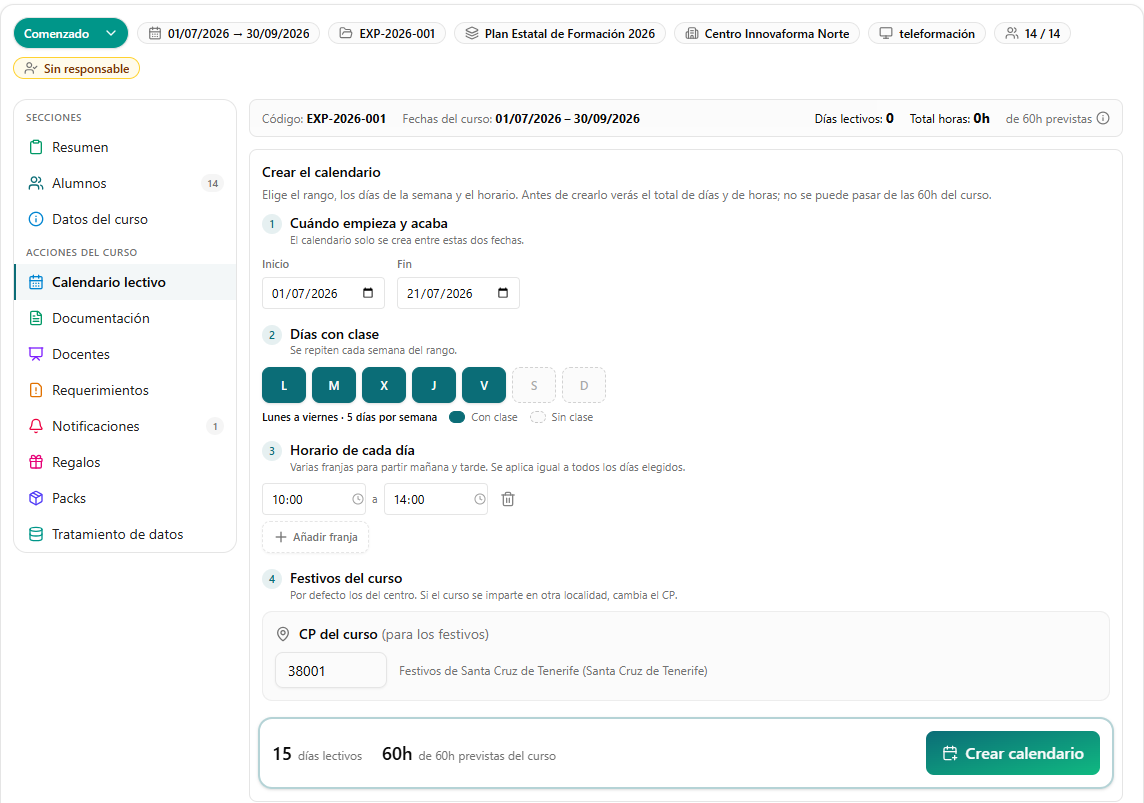
Organise each course calendar: teaching days and hours, non-teaching days and total hours. Overlap and excess-hours notices use credits.
Group courses by funding call, with their plan, year, training centre and the enrolment form each student will complete.
Keep each trainer’s CV, hours, annexes and contracts per course. Client companies carry their CNAE code, sector and linked students.
Create email and WhatsApp templates for your courses, connect your WhatsApp, e-signature and email, and receive notices in your inbox. Sending uses credits.
Standard works with the Management role, which can do everything, and every screen has its video tutorial.
Each sales representative works their own student portfolio. Management reviews monthly commissions, generates settlements with PDF receipts and approves changes of representative.
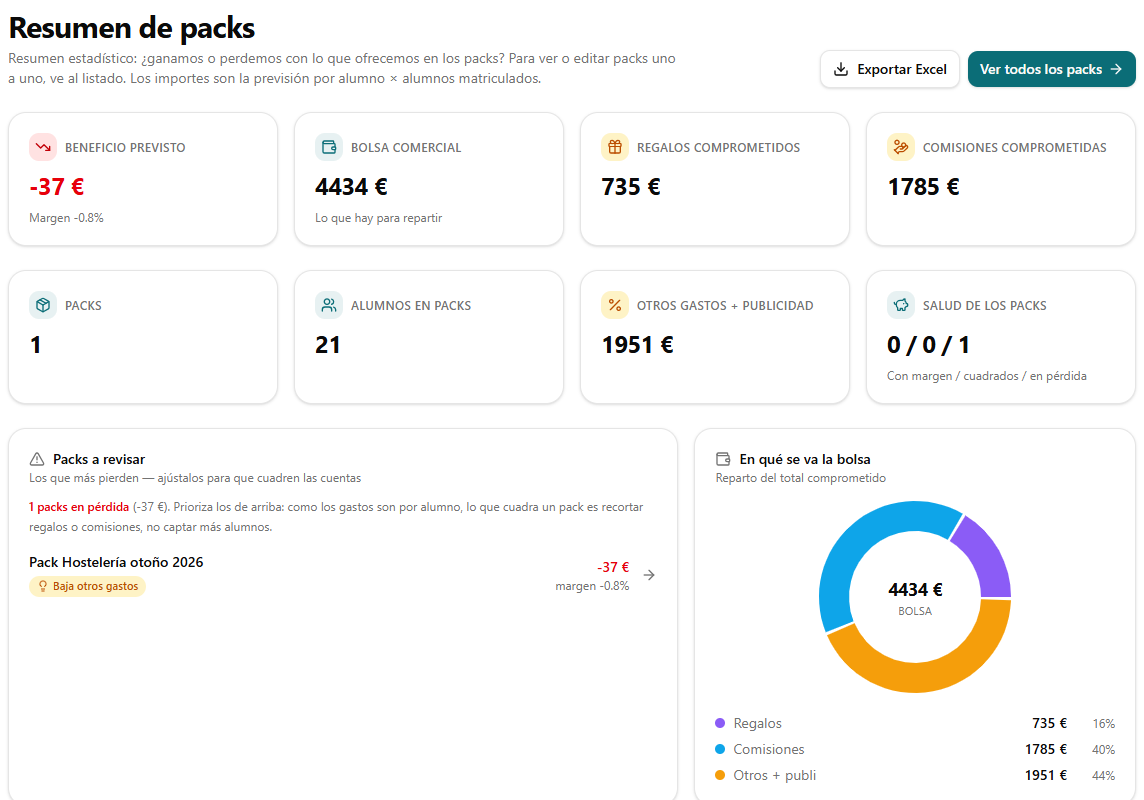
Build course packs with gifts and commissions and check whether each one leaves a margin. The forecast calculates each record’s margin before delivery.
Record each requirement with its deadline, owner and the people involved. The status changes with urgency, and everyone involved confirms receipt.
Keep interested students by sector, delivery mode, topic and centre, so you can offer them a place when a matching course opens.
See who changed what and when, with filters by user, student, action and date.
Indicators by record and training centre (actions, students, passes, hours, unemployed learners and delivery mode), including across the companies in your group, with Excel export.
A day, week or month view of the courses that start, consolidate or finish, so you can share out the team’s work.
Bring your Moodle courses and students into Wiso Edu and review their completion data without copying it by hand. Each synchronisation uses credits.
A catalogue and delivery of gifts and gift cards, and read and write API access to connect your systems.
When something changes, the News notice tells the roles it affects in the top bar and stays there until it is read.
On top of the tutorials, the guide walks you through the screen: it highlights each area and opens what it is explaining for you.
Gemini reads ID documents, student and trainer employment records, evaluation reports and requirements, and fills in the data. Without credits, documents are still uploaded, without being read or checked.
Send each student, by WhatsApp or email, the ID-protected link to the form for their funding call, and templates from the course. Wiso Edu generates the official PDF annexes (state, EOI, Canary Islands, education and reskilling). Each message uses credits.
Student annexes sent for electronic signature, and requests to trainers with documents to sign, such as contracts and annexes.
Every day, urgency rises as the deadline approaches and the people involved are notified by inbox, email and WhatsApp. With Premium.
Each student’s schedule is reviewed daily, with a notice by inbox and email if they overlap two courses or exceed their daily hours.
Each course’s status updates itself from its dates, and holidays are loaded into the calendar automatically.
The sales representative is notified when you open a course that matches students waiting for a place. With Premium.
Bulk course and student uploads, official reports and ZIP downloads. Always visible: if you have no credits, Wiso Edu tells you before you use them.
Each update of courses and students from your Moodle uses credits. With Premium.
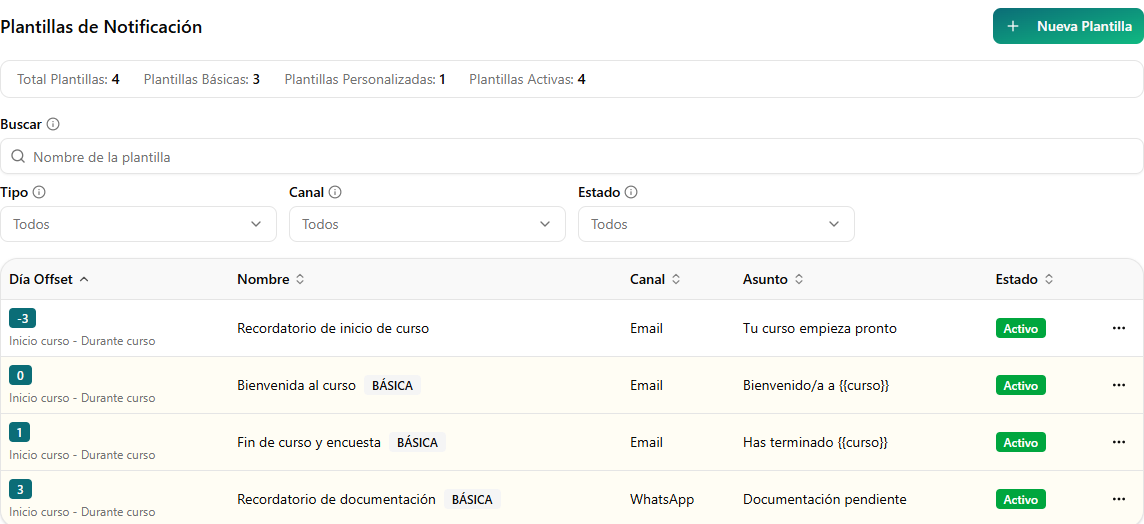
Messaging plans will send each template on its day of the course: welcome, reminders and completion. Today they are sent manually from the course.
Wiso Edu will remind students about documents still waiting for their signature, without you having to resend them.
Each student’s completion in Moodle will be reflected in their Wiso Edu enrolment automatically. With Premium.
Assign trainers, students, classrooms and centres to each session, on-site or online, with the class link for online sessions. With Premium.
Included in Standard
Standard brings together students, courses, calendars, trainers, companies and records: everything your team uses day to day. Automation, such as AI document reading, enrolment forms or WhatsApp messages, uses credits on any plan.
Choose the dates, teaching days and times, and Wiso Edu applies the holidays for the centre or the course’s postcode. Before creating it you see the teaching days and hours, with a warning if it exceeds the course hours.
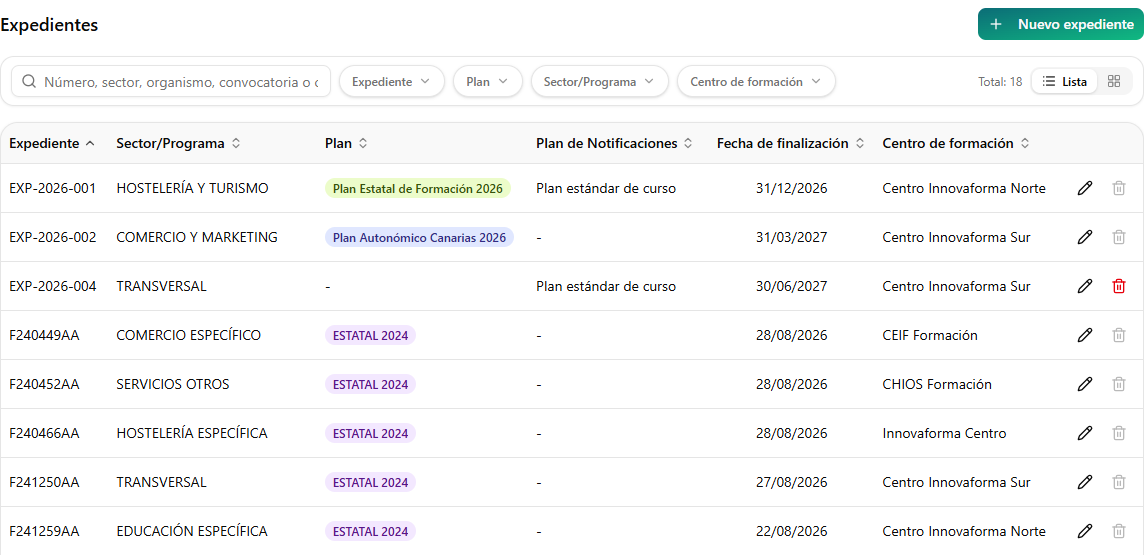
Each record groups the courses of a funding call with their plan, training centre and the notification plan those courses follow. Filter by record, plan, sector or centre to find what you need.
Create email and WhatsApp templates with course details and group them into plans for each stage. Today they are sent from the course and each message uses credits; automatic sending by plan is coming soon.
Premium
Premium gives you full application access for €149/month, with no record limits. Alongside sales management, it includes course tracking, requirements, reservations, the activity log, the Moodle connection, global statistics and gift cards.
Coordinate each representative’s portfolio and training packs. Review commissions, settlements and financial forecasts to keep sales activity connected.
Included in PremiumReview indicators by record and training centre, including across the companies in your group, and export them to Excel.
Included in PremiumAccess the Gift cards section within the platform, alongside your other management tools.
Included in PremiumWhat it looks like in Premium
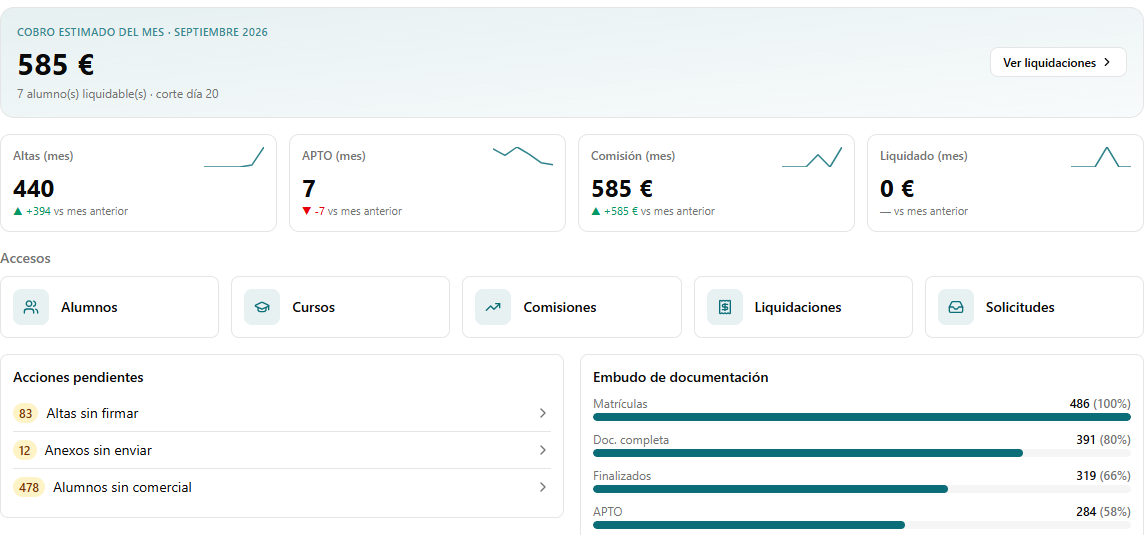
Management and each sales representative see this month’s estimated collections, with a cut-off on the 20th; enrolments, passes and commissions compared with last month; pending actions; and where their students’ documentation stands.
Each pack shows its expected profit, the sales budget and what is committed to gifts and commissions. Loss-making packs come first, with a hint about what to adjust.
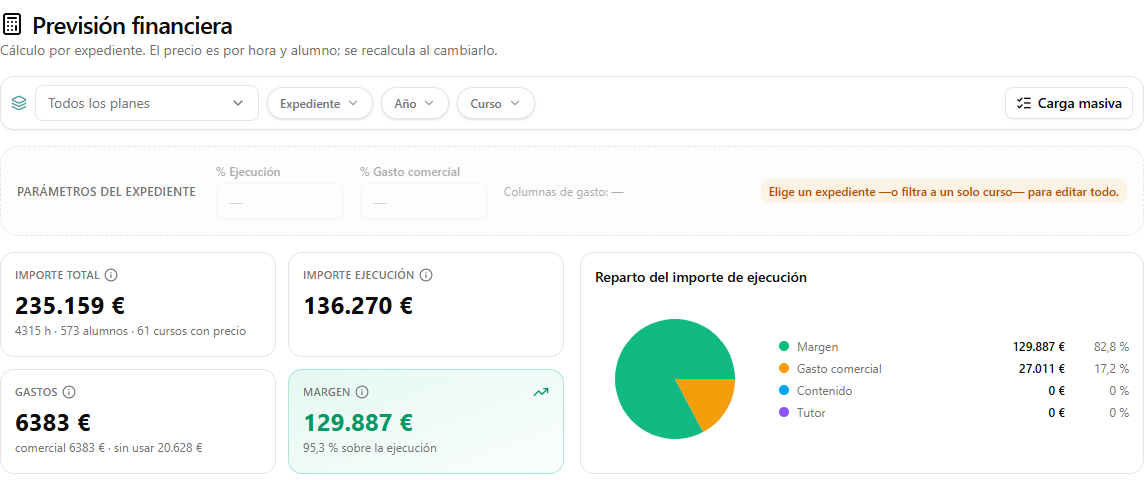
Enter the price per hour and student, and Wiso Edu calculates the total and delivery amounts, expenses and margin for each record and course before delivery.
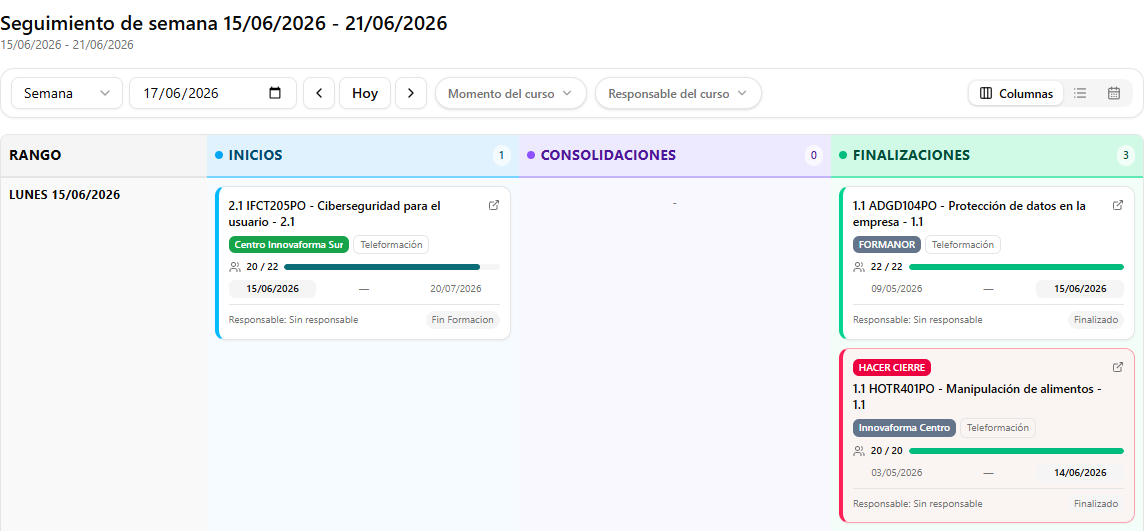
A day, week or month view of the courses that start, consolidate or finish, their training centre and a notice when a course needs closing.
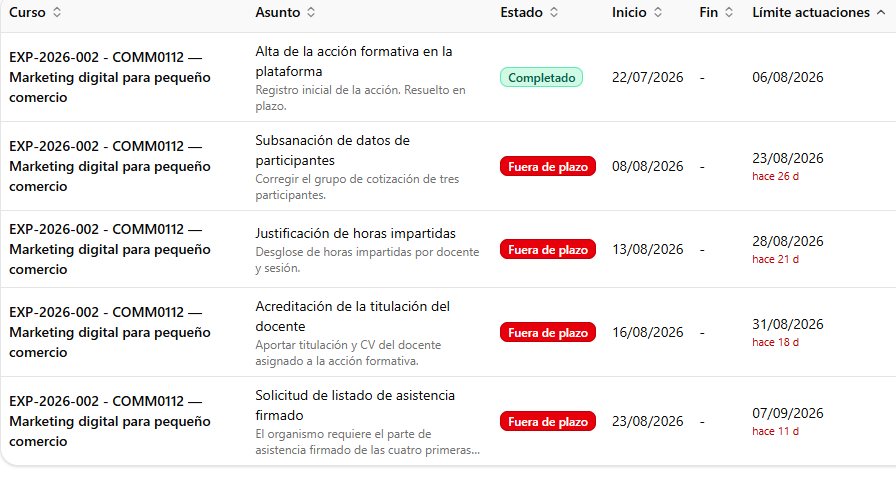
Record what the authority asks for, the deadline and who is responsible. The status moves to attention, critical or overdue as the deadline approaches, and everyone involved confirms receipt. Automatic AI reading of the PDF uses credits.
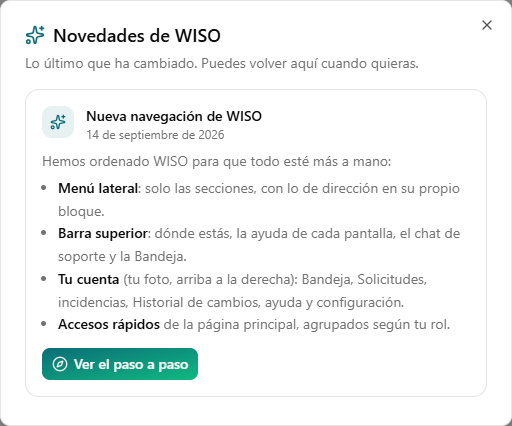
Each notice is published for the roles it affects and stays in the top bar until it is read. Use it for a new screen, a deadline from the funding body or a different way of working.
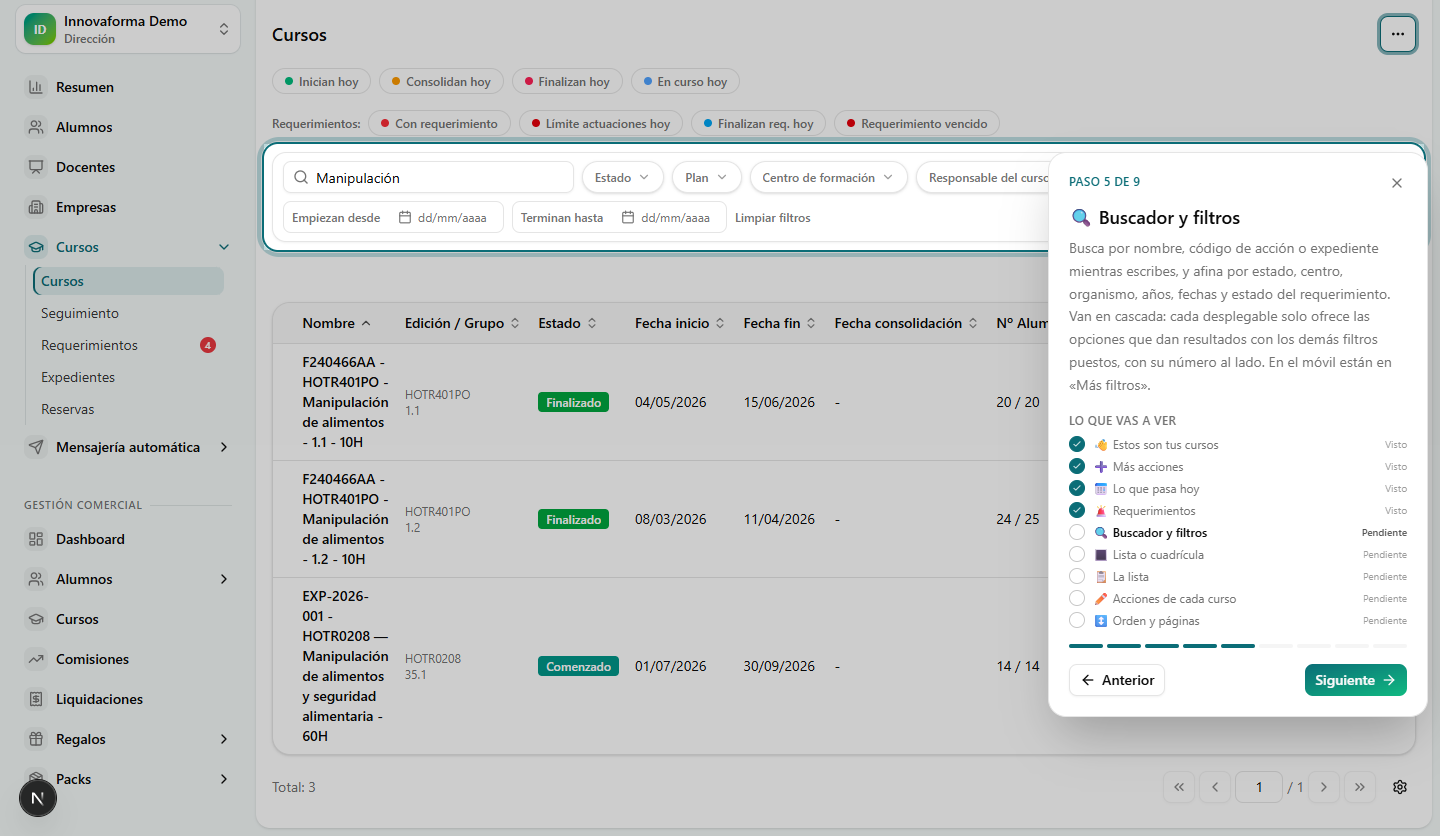
From the Help button, Wiso Edu dims everything else, highlights the area it is talking about and moves on step by step: what the search box finds, what the filters do and where each action is.
Sales management
In “My courses”, each sales representative sees courses with students assigned to them. The card brings together dates, assigned versus total students, and documentation status.
Actual Spanish interface, cropped · Example course · No personal data
Enlarge screenshot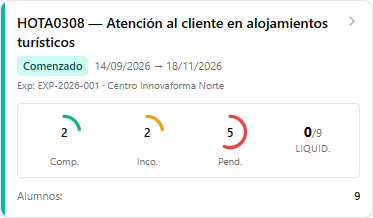
Getting started with Wiso Edu
Enter your name and email in the form. Telling us what you need to manage is optional.
We help you assess Standard or Premium for your needs. You do not have to decide before contacting us.
Our team arranges access with you, with no setup fee on either Standard or Premium.
Wiso Code Canarias SLU · Tax ID B25996406 · Fully remote team · About Wiso Code
Frequently asked questions
Wiso Edu is management software for training centres that brings courses, students and administrative operations together. It is available with team-assisted access from Wiso Code. It does not replace the learning platform where you deliver course content.
Contact our team to explore the platform and choose a plan. Account setup is free on both Standard and Premium, and our team arranges access with you; this website does not offer online sign-up or payment.
Standard includes non-priority support with a response in 7 days. Premium includes priority support with a response in 24 hours and access to an online AI support chat, available 24/7. This 24/7 availability applies to the AI chat, not round-the-clock human support. These are response times, not resolution times.
Standard is free and includes day-to-day centre management (students, courses, course calendars, trainers, companies, records and training centres) for up to 1,000 courses, 100 records, 10,000 students, 100 trainers, 500 companies and 3 centres, with the Management role and video tutorials, and without the public API. Premium adds Sales management, course packs, course tracking, requirements, reservations, the activity log, the Moodle connection, Global statistics and Gift cards, with no record limits, all roles, News, step-by-step guided help and read and write access to the API. You can choose monthly or annual billing. Automation credits are purchased separately.
Standard limits count all stored courses, records, students, trainers, companies and training centres, including historical records, regardless of status.
Monthly · €149/month. Renews monthly, with no minimum term. Annual Premium: €1,490/year. Save €298 compared with 12 monthly payments: 2 months off. €1,490 billed annually. Equivalent to €124.17/month. Prices exclude taxes; credits are purchased separately. Our team will confirm the terms for your chosen plan before you subscribe.
No. Wiso Edu focuses on training operations and administration. It helps you organise students, courses, documents and communications; your learning platform remains the place where you deliver course content.
Credits are purchased in packs and pay for platform automation: AI document recognition, communications and enrolment forms, WhatsApp and email messages, electronic signatures, automatic follow-up, imports and exports. A 100-credit pack costs €100; 500 credits cost €450; and 2,000 credits cost €1,600. Credits are separate from the subscription.
Credit usage per automation is still being defined. We will publish it once confirmed. One credit does not necessarily equal one task.
You can keep working. Documents are still uploaded, without automatic reading or checks, and actions that need credits, such as importing or exporting to Excel, remain visible and tell you to top up your credits before using them.
For now, our team handles access and commercial enquiries. This website does not offer self-service registration or online payments.